
Long story short, I cooked up a cute little Chrome extension where, whenever you’re browsing a book listing on Amazon.com, it will automatically look up that book’s ISBN and let you know if it’s available at various San Francisco Bay Area libraries. Thinking of buying a book? Maybe you can save some money (and support your community) by picking up a copy at the library.
The full list of supported libraries is:
- San Francisco
- Alameda County
- Contra Costa County
- Hayward
- Livermore
- Marin County
- Napa County
- Oakland
- Palo Alto City
- Pleasanton
- San José
- San Mateo County
- Santa Clara County
- Sonoma County
The county-wide library systems typically represent libraries from several cities within that county. To switch between them, you need to select one in the extension’s options page.
The extension notifies you with a link right underneath the author’s name, like so:
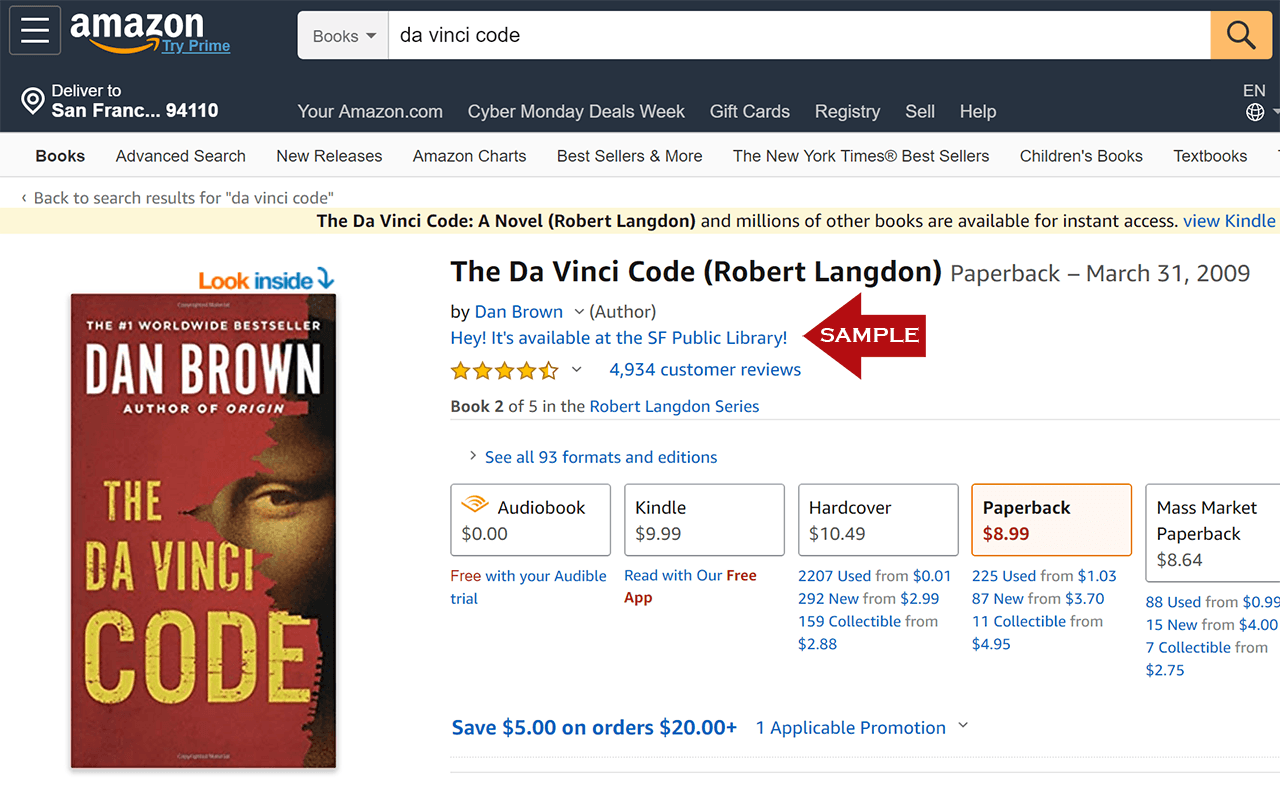
Note that because the plugin is keyed off ISBN, it doesn’t always register on every product page at Amazon. For example, if you’re looking at the Kindle page, it might not find anything at all. You might also need to play around, switching between the paperback and hardcover versions of the book.
The extension is confirmed to work on Microsoft Edge, and it will probably work on any other Chromium-based browser, too. You can install it from the Chrome Web Store here.
Tech Notes: The current version is much improved from previous ones. For one thing, in keeping with the Chrome Extension Manifest v3 format, it no longer uses a Background Page, so it’s no longer running all the time in the background. I’ve also switched it from using the legacy SFPL online catalog to the new catalog based on Bibliocommons. An additional prompt has also been added that suggests you reserve a copy of a book when all available copies are currently checked out at the SFPL.
Amazon occasionally changes its product page UI, which can break how this extension works. If you think you’ve spotted such an instance, let me know.
If you want to check out the source code for yourself (and, potentially, adjust it to work with your own local library), you can find it on GitHub here.
Historical Context: Long, long ago, my former colleague at InfoWorld, Jon Udell, came up with a really clever JavaScript hack for avid readers who use Firefox, called LibraryLookup. Jon wrote the script for the libraries in his hometown of Keene, New Hampshire, but his original idea has since been modified to work with the libraries of communities across the globe. I never found a good version for San Francisco, though, so I hacked together my own version to work with the SFPL’s unique quirks.
Jon’s original version was built for use with a Firefox plugin called Greasemonkey, so my initial version was, too. However, I no longer use Firefox on a regular basis, so I rewrote the code (or a version of it) as a Chrome Extension, and I no longer maintain the Greasemonkey version. You may be able to find a way to use it in a recent version of Firefox anyway; ask the internet for some potential methods.
Thank you for doing this for SFPL. 🙂